
Table of Contents
Introduction
One of the most confusing aspects of PostgreSQL’s logical replication is understanding the relationship between WHERE conditions in your SQL statements and REPLICA IDENTITY configuration. Many developers mistakenly believe that:
“If I use a WHERE clause with specific conditions, PostgreSQL will replicate only those conditions to the subscriber database.”
This is fundamentally incorrect, and it’s the source of many replica identity-related bugs and performance problems.
This article will clarify:
- The critical difference between WHERE conditions and REPLICA IDENTITY
- How logical replication really works under the hood
- Why WHERE conditions don’t matter for replication
- How REPLICA IDENTITY actually identifies rows on the subscriber
By the end of this article, you’ll have a complete understanding of how PostgreSQL determines which rows to replicate and why REPLICA IDENTITY is the true determining factor—not your WHERE clause.
Core Concepts
What is a WHERE Clause?
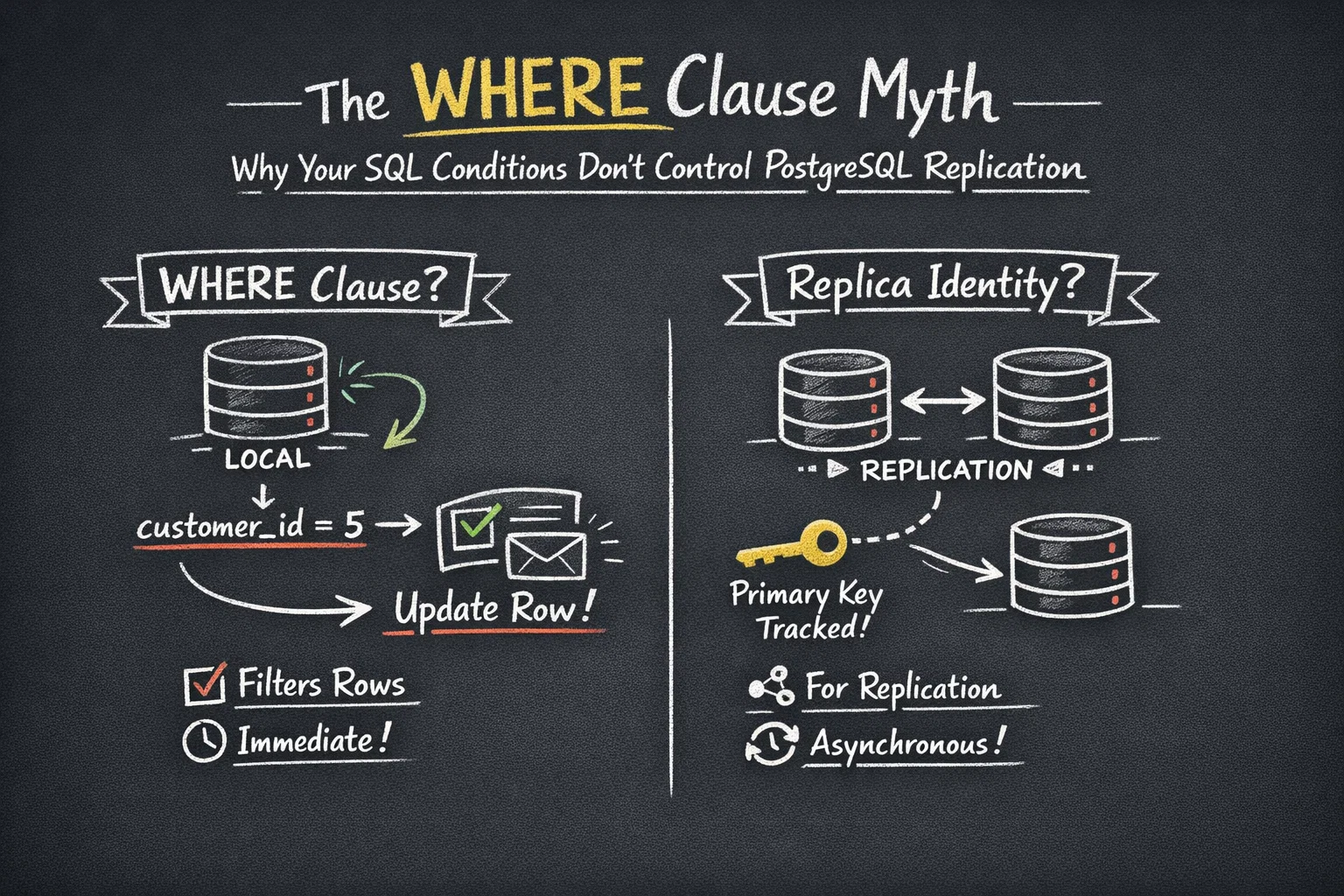
A WHERE clause is a SQL language construct that filters which rows your statement affects in the current database execution:
UPDATE orders
SET status = 'shipped'
WHERE customer_id = 5;
This tells PostgreSQL: “In my local database, find all rows where customer_id = 5, and update them.”
Scope: Local database only. Execution time: Immediate.
What is Replica Identity?
REPLICA IDENTITY is a PostgreSQL configuration setting that tells the logical replication system: “When this row is modified, use these columns to identify it for replication purposes.”
ALTER TABLE orders REPLICA IDENTITY DEFAULT;
This tells PostgreSQL: “When replicating changes to this table, use the primary key to identify which rows were changed.”
See also: Mastering the Linux Command Line — Your Complete Free Training Guide
Scope: Replication system only. Execution time: When replication occurs (asynchronous).
The Fundamental Difference
WHERE CLAUSE
├─ Purpose: Filter rows for SQL statement execution
├─ Scope: Only affects the current database
├─ Execution:  Immediate, on the local server
└─ Replication Impact: ❌ NONE

REPLICA IDENTITY
├─ Purpose: Identify rows for logical replication
├─ Scope: Affects how changes are sent to subscribers
├─ Execution: When replication occurs (async)
└─ Replication Impact: ✅ CRITICAL
The Critical Distinction
Let me illustrate the most important concept in this article with a real example:
The Common Misconception
-- Publisher ()
UPDATE orders
SET status = 'shipped'
WHERE customer_id = 5;

-- Developer's WRONG assumption:
-- "The subscriber will receive:
--  UPDATE orders SET status = 'shipped' WHERE customer_id = 5;"
The Reality
-- Publisher ()
UPDATE orders
SET status = 'shipped'
WHERE customer_id = 5;

-- What ACTUALLY happens:
-- PostgreSQL finds all rows matching customer_id = 5
-- For EACH matching row, it extracts the REPLICA IDENTITY columns
-- It sends INDIVIDUAL UPDATE statements for each row,
-- using only the REPLICA IDENTITY columns (e.g., primary key)

-- If customer_id = 5 matches orders:  100, 101, 102, then subscriber receives:
UPDATE orders SET status = 'shipped' WHERE order_id = 100;
UPDATE orders SET status = 'shipped' WHERE order_id = 101;
UPDATE orders SET status = 'shipped' WHERE order_id = 102;

-- NOT the original WHERE clause!
This is the core insight you must understand.
How Replica Identity Really Works
Step-by-Step Process
Let me break down exactly what happens when you execute an UPDATE on the publisher:
Step 1: Execute the SQL Statement on Publisher
-- Publisher database
UPDATE orders
SET status = 'shipped'
WHERE customer_id = 5 AND order_date > '2024-01-01';

-- PostgreSQL uses the WHERE clause to identify affected rows:
-- Results:  order_id = 100, 101, 102, 103 (4 rows matched)
Step 2: Extract REPLICA IDENTITY for Each Row
Assuming REPLICA IDENTITY is set to DEFAULT (using primary key):
Row 1: order_id = 100 ← Extract this (primary key)
Row 2: order_id = 101 ← Extract this
Row 3: order_id = 102 ← Extract this
Row 4: order_id = 103 ← Extract this
The original WHERE clause (customer_id = 5 AND order_date > '2024-01-01') is discarded.
Step 3: Write to Write-Ahead Log (WAL)
PostgreSQL writes to the WAL (simplified representation):
{
  "operation": "UPDATE",
  "table": "orders",
  "tuples": [
    {"order_id": 100, "new_status": "shipped"},
    {"order_id": 101, "new_status": "shipped"},
    {"order_id": 102, "new_status": "shipped"},
    {"order_id": 103, "new_status": "shipped"}
  ]
}
Notice: **No WHERE clause is stored! ** Only the REPLICA IDENTITY columns.
Step 4: Logical Replication Reads from WAL
The logical replication system reads the WAL and prepares change messages for subscribers.
Step 5: Subscriber Receives Changes
The subscriber receives (simplified):
UPDATE orders SET status = 'shipped' WHERE order_id = 100;
UPDATE orders SET status = 'shipped' WHERE order_id = 101;
UPDATE orders SET status = 'shipped' WHERE order_id = 102;
UPDATE orders SET status = 'shipped' WHERE order_id = 103;
Step 6: Subscriber Applies Changes
The subscriber executes these UPDATE statements. It doesn’t matter what the original WHERE clause was. The subscriber uses only the REPLICA IDENTITY columns.
Visual Flow Diagram
┌─────────────────────────────────────────────────────────────┐
│ PUBLISHER DATABASE                                          │
│                                                             │
│ UPDATE orders SET status = 'shipped'                        │
│ WHERE customer_id = 5 AND order_date > '2024-01-01';       │
│                                                             │
│ ↓ WHERE clause finds 4 rows (order_id:  100,101,102,103)    │
└─────────────────────────────────────────────────────────────┘
                            ↓
┌─────────────────────────────────────────────────────────────┐
│ EXTRACT REPLICA IDENTITY (Default = Primary Key)            │
│                                                             │
│ For each matched row, extract only REPLICA IDENTITY:        │
│ Row 100 → {order_id: 100}                                  │
│ Row 101 → {order_id: 101}                                  │
│ Row 102 → {order_id: 102}                                  │
│ Row 103 → {order_id: 103}                                  │
│                                                             │
│ ❌ Original WHERE clause is DISCARDED                       │
└─────────────────────────────────────────────────────────────┘
                            ↓
┌─────────────────────────────────────────────────────────────┐
│ WRITE-AHEAD LOG (WAL)                                       │
│                                                             │
│ {operation: UPDATE, table: orders,                          │
│  tuples: [{order_id: 100,... }, {order_id:101,... }, ... ]}   │
│                                                             │
│ ❌ WHERE clause NOT stored                                  │
│ ✅ REPLICA IDENTITY columns stored                          │
└─────────────────────────────────────────────────────────────┘
                            ↓
┌─────────────────────────────────────────────────────────────┐
│ LOGICAL REPLICATION SENDS TO SUBSCRIBER                     │
│                                                             │
│ UPDATE orders SET status = 'shipped' WHERE order_id = 100;  │
│ UPDATE orders SET status = 'shipped' WHERE order_id = 101;  │
│ UPDATE orders SET status = 'shipped' WHERE order_id = 102;  │
│ UPDATE orders SET status = 'shipped' WHERE order_id = 103;  │
└─────────────────────────────────────────────────────────────┘
                            ↓
┌─────────────────────────────────────────────────────────────┐
│ SUBSCRIBER DATABASE                                         │
│                                                             │
│ ✅ Rows with order_id 100,101,102,103 are updated         │
│ ✅ Data is consistent with publisher                       │
└─────────────────────────────────────────────────────────────┘
Practical Examples
Example 1: WHERE Clause Using Non-Primary Key Column
Scenario: E-commerce order management system
-- ============= PUBLISHER SETUP =============

CREATE TABLE orders (
    order_id BIGSERIAL PRIMARY KEY,
    customer_id INTEGER NOT NULL,
    order_date TIMESTAMP,
    status VARCHAR(50),
    total_amount DECIMAL(10, 2)
);

-- Configure REPLICA IDENTITY with primary key
ALTER TABLE orders REPLICA IDENTITY DEFAULT;

-- ============= PUBLISHER EXECUTION =============

-- You execute this UPDATE
UPDATE orders
SET status = 'cancelled'
WHERE customer_id = 42;

-- This matches 5 rows: order_id = 1001, 1002, 1003, 1004, 1005
What gets stored in WAL:
[
  {operation: UPDATE, old_id: 1001, new_status: cancelled},
  {operation:  UPDATE, old_id: 1002, new_status: cancelled},
  {operation: UPDATE, old_id: 1003, new_status: cancelled},
  {operation: UPDATE, old_id:  1004, new_status:  cancelled},
  {operation: UPDATE, old_id: 1005, new_status: cancelled}
]
Notice: customer_id = 42 is NOT in the WAL. Only order_id (REPLICA IDENTITY).
What subscriber receives:
UPDATE orders SET status = 'cancelled' WHERE order_id = 1001;
UPDATE orders SET status = 'cancelled' WHERE order_id = 1002;
UPDATE orders SET status = 'cancelled' WHERE order_id = 1003;
UPDATE orders SET status = 'cancelled' WHERE order_id = 1004;
UPDATE orders SET status = 'cancelled' WHERE order_id = 1005;
Result: ✅ Replication succeeds because REPLICA IDENTITY (primary key) is correctly configured.
Example 2: Complex WHERE Clause (Multiple Conditions)
Scenario: Product price management system
-- ============= PUBLISHER SETUP =============

CREATE TABLE products (
    product_id BIGSERIAL PRIMARY KEY,
    category_id INTEGER,
    supplier_id INTEGER,
    price DECIMAL(10, 2),
    stock_quantity INTEGER,
    last_updated TIMESTAMP
);

ALTER TABLE products REPLICA IDENTITY DEFAULT;

-- ============= PUBLISHER EXECUTION =============

-- Complex WHERE clause with multiple conditions
UPDATE products
SET price = price * 1.1,
    last_updated = CURRENT_TIMESTAMP
WHERE category_id = 5
  AND supplier_id = 10
  AND stock_quantity > 100
  AND price < 100;

-- Matches 12 rows with product_id:  50, 51, 52, .. ., 61
What gets stored in WAL:
[
  {operation: UPDATE, old_id: 50, new_price:  .. ., new_last_updated: ...},
  {operation: UPDATE, old_id:  51, new_price: .. ., new_last_updated: ... },
  {operation: UPDATE, old_id: 52, new_price: ..., new_last_updated: ...},
  ...  (12 rows total)
]
- *Complex WHERE clause is completely absent from WAL! **
What subscriber receives:
UPDATE products SET price = .. ., last_updated = ... WHERE product_id = 50;
UPDATE products SET price = ..., last_updated = ... WHERE product_id = 51;
UPDATE products SET price = ..., last_updated = ...  WHERE product_id = 52;
-- ... (12 total)
Result: ✅ Perfect replication. The WHERE clause complexity is irrelevant to replication.
Example 3: DELETE with Complex WHERE Clause
Scenario: Log cleanup system
-- ============= PUBLISHER SETUP =============

CREATE TABLE audit_logs (
    log_id BIGSERIAL PRIMARY KEY,
    user_id INTEGER,
    action VARCHAR(100),
    log_timestamp TIMESTAMP,
    ip_address INET
);

ALTER TABLE audit_logs REPLICA IDENTITY DEFAULT;

-- ============= PUBLISHER EXECUTION =============

-- Delete old logs for specific users
DELETE FROM audit_logs
WHERE user_id IN (SELECT user_id FROM deleted_users)
  AND log_timestamp < '2024-01-01'
  AND action IN ('LOGIN_FAILED', 'UNAUTHORIZED_ACCESS');

-- Matches 1,000 rows
What gets stored in WAL:
[
  {operation: DELETE, old_id: 100},
  {operation: DELETE, old_id: 145},
  {operation: DELETE, old_id: 201},
  ... (1,000 rows total, using only log_id)
]
What subscriber receives:
DELETE FROM audit_logs WHERE log_id = 100;
DELETE FROM audit_logs WHERE log_id = 145;
DELETE FROM audit_logs WHERE log_id = 201;
-- ... (1,000 total)
Result: ✅ All 1,000 rows are correctly deleted on subscriber.
Common Misconceptions
❌ Misconception 1: “I can use any WHERE clause and replication will work”
CREATE TABLE users (
    user_id UUID
    -- NO PRIMARY KEY!
);

ALTER TABLE users REPLICA IDENTITY NOTHING;  -- ❌ WRONG!

UPDATE users SET status = 'active' WHERE user_id = 'abc-123';
Problem: Even though you specified WHERE user_id = 'abc-123', replication fails because REPLICA IDENTITY is NOTHING.
Correct Solution:
ALTER TABLE users ADD PRIMARY KEY (user_id);
ALTER TABLE users REPLICA IDENTITY DEFAULT;  -- ✅ CORRECT
❌ Misconception 2: “WHERE clause becomes the REPLICA IDENTITY”
UPDATE orders SET status = 'shipped' WHERE customer_id = 5;

-- ❌ WRONG ASSUMPTION:
-- "The subscriber will know to update only customer_id = 5"

-- ✅ CORRECT:
// The subscriber will use the REPLICA IDENTITY (e.g., primary key)
// to identify each row, regardless of the WHERE clause
❌ Misconception 3: “Different WHERE clauses on different rows cause issues”
-- Scenario: Two UPDATE statements with different WHERE clauses

UPDATE orders SET status = 'shipped' WHERE customer_id = 5;
UPDATE orders SET status = 'processed' WHERE order_date > '2024-01-01';

// ❌ WRONG ASSUMPTION:
// "The subscriber might get confused about which WHERE clause applies"

// ✅ CORRECT:
// Each row is identified by REPLICA IDENTITY (primary key)
// The WHERE clauses are completely irrelevant to replication
✅ Correct Understanding
-- Publisher
UPDATE orders SET status = 'shipped' WHERE customer_id = 5;

-- This is understood as:
-- Step 1: Find all rows WHERE customer_id = 5 (LOCAL only)
// Step 2: For each matching row, extract its REPLICA IDENTITY
// Step 3: Send to subscriber using REPLICA IDENTITY, NOT the WHERE clause
Detailed Comparison Table
Comparison: WHERE Clause vs. REPLICA IDENTITY
| Aspect | WHERE Clause | REPLICA IDENTITY |
|---|---|---|
| Purpose | Filter rows for SQL execution | Identify rows for replication |
| Scope | Local database only | Replication system only |
| Execution Timing | Immediate | Asynchronous (replication time) |
| Controls | Which rows are affected locally | How to find rows on subscriber |
| Affects Replication | ❌ NO | ✅ YES (critical) |
| Can Use Any Columns | ✅ Yes | ⚠️ No (must be unique, not null) |
| Stored in WAL | ❌ No | ✅ Yes |
| Sent to Subscriber | ❌ No | ✅ Yes |
| Example | WHERE customer_id = 5 | Primary key, unique index |
| Performance Impact | Local query performance | Replication efficiency |
REPLICA IDENTITY Options and WHERE Clause Compatibility
| REPLICA IDENTITY | Allows WHERE Clause | UPDATE Replicates | DELETE Replicates | Notes |
|---|---|---|---|---|
| DEFAULT | ✅ Any | ✅ Yes | ✅ Yes | Uses primary key, best performance |
| FULL | ✅ Any | ✅ Yes | ✅ Yes | Uses all columns, poor performance |
| USING INDEX | ✅ Any | ✅ Yes | ✅ Yes | Uses specified unique index |
| NOTHING | ✅ Any | ❌ No | ❌ No | No row identification |
Key Insight: The WHERE clause you use does NOT affect whether replication succeeds. Only REPLICA IDENTITY does.
Real-World Scenarios
Scenario 1: Multi-Tenant SaaS Platform
Problem: You need to update order status for a specific tenant, but you might use different WHERE conditions at different times.
-- ============= SETUP =============

CREATE TABLE orders (
    order_id BIGSERIAL PRIMARY KEY,
    tenant_id INTEGER NOT NULL,
    customer_id INTEGER,
    status VARCHAR(50),
    created_at TIMESTAMP
);

ALTER TABLE orders REPLICA IDENTITY DEFAULT;

-- ============= DAY 1: Update by tenant =============

UPDATE orders SET status = 'processed' WHERE tenant_id = 100;
-- Matches 500 rows, all replicate correctly ✅

-- ============= DAY 2: Update by date =============

UPDATE orders SET status = 'archived' WHERE created_at < '2024-01-01';
// Matches 2,000 rows, all replicate correctly ✅

// ============= DAY 3: Update by customer =============

UPDATE orders SET status = 'on_hold' WHERE customer_id = 42;
// Matches 15 rows, all replicate correctly ✅

// ============= WHY DOES IT ALL WORK? =============

// Because REPLICA IDENTITY is set to DEFAULT (primary key)
// PostgreSQL extracts order_id for each matched row
// and sends that to the subscriber
// The WHERE clause variety doesn't matter!
Scenario 2: Inventory Management with Multiple Warehouses
Challenge: Different UPDATE statements with different WHERE clauses
-- ============= SETUP =============

CREATE TABLE inventory (
    inventory_id BIGSERIAL PRIMARY KEY,
    product_id BIGINT,
    warehouse_id INTEGER,
    quantity INTEGER,
    last_checked TIMESTAMP
);

ALTER TABLE inventory REPLICA IDENTITY DEFAULT;

-- ============= MULTIPLE UPDATE PATTERNS =============

-- Update inventory by warehouse
UPDATE inventory SET last_checked = NOW() WHERE warehouse_id = 1;

-- Update inventory for a product
UPDATE inventory SET quantity = quantity - 100 WHERE product_id = 999;

-- Update low stock items
UPDATE inventory SET quantity = 500 WHERE quantity < 50 AND warehouse_id = 2;

-- All of these work perfectly ✅
// Because REPLICA IDENTITY (primary key) is always used
// regardless of WHERE clause complexity
Scenario 3: Financial Transaction Processing
Requirement: Strict data consistency across distributed databases
-- ============= SETUP =============

CREATE TABLE transactions (
    txn_id BIGSERIAL PRIMARY KEY,
    account_id BIGINT NOT NULL,
    amount DECIMAL(19, 4),
    txn_status VARCHAR(50),
    timestamp TIMESTAMP
);

CREATE UNIQUE INDEX idx_account_timestamp
ON transactions(account_id, timestamp);

-- Using composite primary key for REPLICA IDENTITY
ALTER TABLE transactions REPLICA IDENTITY DEFAULT;

-- ============= COMPLEX BUSINESS LOGIC =============

-- Update transaction status by status value
UPDATE transactions SET txn_status = 'cleared'
WHERE txn_status = 'pending' AND timestamp < NOW() - INTERVAL '1 hour';

-- Update recent transactions
UPDATE transactions SET txn_status = 'failed'
WHERE txn_status = 'processing'
  AND timestamp > NOW() - INTERVAL '30 minutes'
  AND account_id IN (SELECT account_id FROM risk_accounts);

-- All replicates correctly!  ✅
// Why?  REPLICA IDENTITY (composite primary key) is used
// for row identification, not the complex WHERE clause
Performance Implications
Why WHERE Clause Type Doesn’t Affect Replication Performance
-- Both statements replicate with the SAME efficiency:

-- Scenario A: WHERE using primary key
UPDATE orders SET status = 'shipped' WHERE order_id = 100;
-- WAL size: Small (only order_id stored)
// Replication traffic: Minimal

-- Scenario B: WHERE using non-indexed column
UPDATE orders SET status = 'shipped'
WHERE customer_name = 'John Smith' AND email = '[email protected]';
// WAL size:  SAME size (still only order_id stored)
// Replication traffic:  SAME as Scenario A

// The WHERE clause complexity is IRRELEVANT to replication!
What DOES Affect Replication Performance: REPLICA IDENTITY Type
-- Scenario 1: REPLICA IDENTITY = DEFAULT (primary key)
ALTER TABLE orders REPLICA IDENTITY DEFAULT;

UPDATE orders SET status = 'shipped' WHERE customer_id = 5;
// WAL size: 50 bytes per row
// For 1,000 rows: ~50 KB
// Replication efficiency: ✅ Excellent

-- Scenario 2: REPLICA IDENTITY = FULL (all columns)
ALTER TABLE orders REPLICA IDENTITY FULL;

UPDATE orders SET status = 'shipped' WHERE customer_id = 5;
// WAL size: 500 bytes per row (all columns stored)
// For 1,000 rows: ~500 KB
// Replication efficiency: ❌ 10x worse

// The WHERE clause is the SAME,
// but REPLICA IDENTITY choice changes efficiency 10-fold!
Key Takeaway: It’s REPLICA IDENTITY configuration, not WHERE clause complexity, that affects replication performance.
Best Practices and Recommendations
✅ DO
- Always configure REPLICA IDENTITY explicitly
-- ✅ Good
ALTER TABLE important_table REPLICA IDENTITY DEFAULT;
- Use primary keys for efficient replication
-- ✅ Good
CREATE TABLE users (
    user_id BIGSERIAL PRIMARY KEY,
    ...
);
- Use FULL only when absolutely necessary
-- ✅ Only if no primary key exists and you must replicate updates/deletes
ALTER TABLE legacy_table REPLICA IDENTITY FULL;
- Document your REPLICA IDENTITY choices
-- ✅ Add comments explaining why
CREATE TABLE orders (
    order_id BIGSERIAL PRIMARY KEY,
    ...
);
-- Using DEFAULT replica identity for efficient logical replication
- Monitor replication performance
-- ✅ Check WAL size and replication lag
SELECT slot_name, slot_type, confirmed_flush_lsn
FROM pg_replication_slots;
❌ DON’T
- Don’t use NOTHING on tables you want to replicate
-- ❌ Bad - UPDATE/DELETE won't replicate
ALTER TABLE orders REPLICA IDENTITY NOTHING;
- Don’t assume DEFAULT is set
-- ❌ Don't assume
UPDATE orders SET status = 'shipped' WHERE order_id = 100;

// ✅ Do verify
SELECT relname, relreplident FROM pg_class WHERE relname = 'orders';
- Don’t use FULL for high-volume tables
-- ❌ Bad for high traffic
CREATE TABLE events (
    event_id BIGSERIAL,
    ...
);
ALTER TABLE events REPLICA IDENTITY FULL;

// ✅ Good - add primary key
ALTER TABLE events ADD PRIMARY KEY (event_id);
ALTER TABLE events REPLICA IDENTITY DEFAULT;
- Don’t think WHERE clause affects replication
-- ❌ Wrong thinking
// "I'll use WHERE to control what gets replicated"

// ✅ Right thinking
// WHERE controls local execution, REPLICA IDENTITY controls replication
- Don’t change REPLICA IDENTITY frequently
-- ❌ Bad practice
ALTER TABLE orders REPLICA IDENTITY DEFAULT;
-- ...  later
ALTER TABLE orders REPLICA IDENTITY FULL;
-- ... much later
ALTER TABLE orders REPLICA IDENTITY USING INDEX idx_order_number;

// ✅ Good practice - decide once and document it
Troubleshooting Guide
Problem 1: “UPDATE/DELETE not replicating”
Symptoms: Changes appear on publisher but not on subscriber
Diagnosis:
-- Check REPLICA IDENTITY
SELECT relname, relreplident FROM pg_class WHERE relname = 'your_table';

-- If output shows 'n' (NOTHING), that's your problem
Solution:
-- If table has primary key
ALTER TABLE your_table REPLICA IDENTITY DEFAULT;

-- If no primary key
ALTER TABLE your_table ADD PRIMARY KEY (unique_column);
ALTER TABLE your_table REPLICA IDENTITY DEFAULT;

-- If you can't add primary key
ALTER TABLE your_table REPLICA IDENTITY FULL;
Problem 2: “My WHERE clause works on publisher but not on subscriber”
Symptoms:
- Publisher:
UPDATE ... WHERE customer_id = 5;affects 100 rows - Subscriber: Still has old data for those rows
Root Cause: REPLICA IDENTITY not properly configured
Solution:
-- Verify WHERE clause matches correctly on BOTH sides
-- The issue is NOT the WHERE clause!
// It's the REPLICA IDENTITY

// Example:
// Publisher: UPDATE orders WHERE customer_id = 5;  // Finds 100 rows
// Problem:  REPLICA IDENTITY = NOTHING (can't replicate)
// Solution: Set REPLICA IDENTITY = DEFAULT or FULL
Problem 3: “WAL size exploding after setting REPLICA IDENTITY FULL”
Symptoms: WAL grows 10-100x larger than before
Root Cause: Using FULL replica identity stores all columns
Solution:
-- Step 1: Find tables using FULL
SELECT relname FROM pg_class WHERE relreplident = 'f';

-- Step 2: For each table, add primary key if missing
ALTER TABLE problem_table ADD COLUMN id BIGSERIAL PRIMARY KEY;

-- Step 3: Switch to DEFAULT
ALTER TABLE problem_table REPLICA IDENTITY DEFAULT;

-- Step 3: Monitor WAL size
SELECT pg_wal_lsn_diff(pg_current_wal_lsn(), '0/0') / (1024*1024) as wal_size_mb;
Problem 4: “Different rows match WHERE clause on publisher and subscriber”
Cause: Data drift between publisher and subscriber
Diagnosis:
-- Compare row counts
-- Publisher
SELECT COUNT(*) FROM orders WHERE customer_id = 5;

-- Subscriber
SELECT COUNT(*) FROM orders WHERE customer_id = 5;

// If different, you have data sync issues
Solution:
-- Resync the subscription
ALTER SUBSCRIPTION my_sub DISABLE;
ALTER SUBSCRIPTION my_sub SET (copy_data = true);
ALTER SUBSCRIPTION my_sub ENABLE;

// Then re-verify REPLICA IDENTITY configuration
SELECT relname, relreplident FROM pg_class WHERE relname = 'orders';
Advanced Scenarios
Scenario 1: Replicating with REPLICA IDENTITY USING INDEX
Sometimes the primary key isn’t the best choice for identifying rows. You can use a different unique index:
-- ============= SETUP =============

CREATE TABLE products (
    product_id BIGSERIAL PRIMARY KEY,
    sku VARCHAR(50) UNIQUE NOT NULL,
    name VARCHAR(200),
    price DECIMAL(10, 2)
);

-- Create unique index on SKU
CREATE UNIQUE INDEX idx_sku ON products(sku);

// Use SKU for REPLICA IDENTITY instead of product_id
ALTER TABLE products REPLICA IDENTITY USING INDEX idx_sku;

-- ============= EXECUTION =============

UPDATE products SET price = 99.99 WHERE category_id = 'ELECTRONICS';

-- What gets sent to subscriber:
// WHERE sku = 'SKU-001'
// WHERE sku = 'SKU-002'
// ...  etc

// ✅ Works perfectly!  Uses SKU to identify rows.
Scenario 2: Composite Primary Key
For tables with composite primary keys, REPLICA IDENTITY uses all key columns:
-- ============= SETUP =============

CREATE TABLE order_items (
    order_id BIGINT,
    line_number INTEGER,
    product_id BIGINT,
    quantity INTEGER,
    PRIMARY KEY (order_id, line_number)
);

ALTER TABLE order_items REPLICA IDENTITY DEFAULT;

// ============= EXECUTION =============

UPDATE order_items SET quantity = 5 WHERE product_id = 100;

// What gets sent to subscriber:
// WHERE order_id = 1001 AND line_number = 1
// WHERE order_id = 1001 AND line_number = 2
// WHERE order_id = 1002 AND line_number = 1
// ...  etc

// Uses BOTH composite key columns for identification
Scenario 3: Handling Tables Without Primary Keys
If you have legacy tables without primary keys:
-- ============= SETUP =============

CREATE TABLE legacy_logs (
    timestamp TIMESTAMP,
    event_type VARCHAR(100),
    details TEXT
    -- NO PRIMARY KEY!
);

// ============= OPTION 1: Add a primary key =============
ALTER TABLE legacy_logs ADD COLUMN log_id BIGSERIAL PRIMARY KEY;
ALTER TABLE legacy_logs REPLICA IDENTITY DEFAULT;

// ============= OPTION 2: Create unique index =============
CREATE UNIQUE INDEX idx_unique_log
ON legacy_logs(timestamp, event_type, md5(details));

ALTER TABLE legacy_logs REPLICA IDENTITY USING INDEX idx_unique_log;

// ============= OPTION 3: Use FULL (⚠️ performance cost) =============
ALTER TABLE legacy_logs REPLICA IDENTITY FULL;

// ============= OPTION 4: No replication for updates/deletes =============
ALTER TABLE legacy_logs REPLICA IDENTITY NOTHING;
// (Only INSERT will replicate)
Summary Table: WHERE Clause vs. REPLICA IDENTITY
SCENARIO:  UPDATE orders SET status = 'shipped' WHERE customer_id = 5;

┌─────────────────────────────────────────────────────────────┐
│ WHERE CLAUSE (customer_id = 5)                              │
│ ├─ Used:  ON PUBLISHER DATABASE                             │
│ ├─ Purpose: Find which rows to update locally              │
│ ├─ Example:  Finds rows with order_id 100,101,102,103       │
│ └─ Sent to subscriber: ❌ NO                               │
└─────────────────────────────────────────────────────────────┘

┌─────────────────────────────────────────────────────────────┐
│ REPLICA IDENTITY (e.g., PRIMARY KEY = order_id)            │
│ ├─ Used: BY REPLICATION SYSTEM                             │
│ ├─ Purpose: Identify rows on SUBSCRIBER                    │
│ ├─ Example: Extracts order_id 100,101,102,103              │
│ └─ Sent to subscriber: ✅ YES                              │
└─────────────────────────────────────────────────────────────┘

RESULT:  Subscriber receives
UPDATE orders SET status = 'shipped' WHERE order_id = 100;
UPDATE orders SET status = 'shipped' WHERE order_id = 101;
UPDATE orders SET status = 'shipped' WHERE order_id = 102;
UPDATE orders SET status = 'shipped' WHERE order_id = 103;
Conclusion
The Key Insight
WHERE clauses and REPLICA IDENTITY are completely independent concerns in PostgreSQL logical replication.
- WHERE clause: Controls which rows are affected on the publisher database
- REPLICA IDENTITY: Controls how rows are identified on the subscriber database
The Most Important Takeaway
╔════════════════════════════════════════════════════════════╗
║                                                            ║
║  The WHERE condition you use in your SQL statement         ║
║  has ZERO impact on logical replication success.            ║
║                                                            ║
║  REPLICA IDENTITY is the ONLY thing that matters          ║
║  for determining if UPDATE/DELETE operations replicate.   ║
║                                                            ║
╚════════════════════════════════════════════════════════════╝
Action Items for Your Database
- Audit all replicated tables:
SELECT relname, relreplident FROM pg_class WHERE relkind = 'r' AND relreplident != 'd'; - For each table without DEFAULT replica identity, decide:
- Add a primary key → Use DEFAULT
- OR create a unique index → Use USING INDEX
- OR accept the performance cost → Use FULL
- Document your REPLICA IDENTITY choices with comments in your DDL
- Test your replication with various WHERE clause patterns to build confidence
- Monitor replication lag and WAL size to ensure efficiency
References
- PostgreSQL Official Documentation: Logical Replication
- PostgreSQL Write-Ahead Log (WAL)
- [PostgreSQL Replica Identity Configuration](https://www.postgresql.org/docs/current/sql-altertable. html)
- Understanding Logical Decoding
- Performance Impact of REPLICA IDENTITY FULL
Author’s Note: This article addresses one of the most commonly misunderstood concepts in PostgreSQL. If you have colleagues working with logical replication, sharing this article could save them from subtle replication bugs that are difficult to debug. The distinction between WHERE clauses and REPLICA IDENTITY is fundamental to getting replication right.



