
PostgreSQL is often hailed as the world’s most advanced open-source database.
However, for those transitioning from other systems, its strict adherence to standards and unique architecture can lead to significant confusion.
Here are the six most common points of friction for PostgreSQL beginners and how to master them.
Table of Contents
1. Databases vs. Schemas: The Hierarchy Trap
New users often struggle with how PostgreSQL organizes data.
A database cluster is a collection of databases managed by a single server instance.
While a cluster can hold many databases, a client connection can only access data in a single database at a time. Inside that database, you have schemas, which are logical groups of objects like tables and functions.
Unlike databases, schemas are not rigidly separated; a user can access objects across different schemas in the same database if they have the proper permissions.
| Level | Scope | Connection Limit |
| Cluster | The entire Postgres server instance | Manages all databases and global users. |
| Database | A top-level container for data. | Rigid Boundary: You can only connect to one at a time. |
| Schema | A namespace within a database (e.g., public, inventory, users). | Fluid Boundary: You can query across them in one session. |
| Object | The actual tables, views, functions, and indexes. | Contained within a specific schema. |
2. The Mysterious search_path
If you create a table and later receive an error that it “does not exist,” the search_path is likely the culprit.
When you reference a table by a simple name (like mytable), the system follows a search path—a list of schemas—to find a match.
The default path is "$user", public, meaning the system looks for a schema matching your username first, then falls back to the “public” schema.
See also: Mastering the Linux Command Line — Your Complete Free Training Guide
If your table is in a custom schema not listed in the path, you must either update the path using SET search_path or use a qualified name like myschema.mytable.
Scenario: You have a table named products sitting inside a custom schema called inventory.
| Current search_path | Query Used | Result |
"$user", public | SELECT * FROM products; | ❌ Fail (Postgres only looks in your user schema and public). |
"$user", public | SELECT * FROM inventory.products; | ✅ Success (The “Qualified Name” bypasses the search path). |
inventory, public | SELECT * FROM products; | ✅ Success (You added the schema to the path, so it’s found). |
3. Case Sensitivity and Double Quotes
PostgreSQL’s handling of identifiers (names of tables, columns, etc.) is a frequent source of frustration.
Unquoted identifiers are automatically folded to lower case. This means MYTABLE, MyTable, and mytable are all treated as the same object.
However, if you wrap a name in double quotes (e.g., "MyTable"), it becomes case-sensitive.
If you created a table with quotes, you must use quotes every time you reference it, or the system will look for the lowercase version and fail.
| How you Created it | How you Query it | Result |
CREATE TABLE MyTable (...) | SELECT * FROM mytable; | ✅ Success (Postgres folded the creation to mytable). |
CREATE TABLE "MyTable" (...) | SELECT * FROM mytable; | ❌ Fail (Postgres looks for mytable, but only "MyTable" exists). |
CREATE TABLE "MyTable" (...) | SELECT * FROM "MyTable"; | ✅ Success (The quotes match the case-sensitive definition). |
4. Roles: The Unified Identity
Unlike many systems that distinguish between “users” and “groups,” PostgreSQL unifies them into Roles.
A role can be a single user (if it has the LOGIN attribute) or a group of users. Roles are global across a cluster, meaning they aren’t tied to a specific database.
Beginners are often confused by inheritance; a user role can be granted membership in a group role, allowing it to “inherit” the group’s privileges automatically.
| Role Type | Key Attribute | Typical Use Case |
| User Role | LOGIN | An individual person or application connecting with a password. |
| Group Role | NOLOGIN | A container for permissions (e.g., readonly_group, admin_group). |
| Member Role | INHERIT | A user who automatically gains all the rights of their assigned groups. |
| Command | Can Login? | Can hold Permissions? | Can belong to other Roles? |
CREATE ROLE bob LOGIN; | ✅ Yes | ✅ Yes | ✅ Yes |
CREATE ROLE managers; | ❌ No | ✅ Yes | ✅ Yes |
GRANT managers TO bob; | — | ✅ (Inherited) | — |
5. Why “Deleted” Data Still Takes Up Space (MVCC)
Beginners are often surprised to find their database size increasing even after deleting rows.
This is due to Multiversion Concurrency Control (MVCC). When you update or delete a row, PostgreSQL does not physically overwrite the old data; instead, it creates a new row version (tuple).
The old versions remain on disk so that concurrent transactions can still see a consistent snapshot of the data. These “dead” rows are only reclaimed for reuse later by a maintenance process called VACUUM.
| Action Taken | What Happens on Disk | Resulting “Live” vs. “Dead” Status |
| INSERT | A new row version (tuple) is written to a page. | ✅ Live: Visible to all new transactions. |
| DELETE | The row is simply “marked” as deleted (not erased). | 💀 Dead: Occupies space but is invisible to new queries. |
| UPDATE | The old row is marked “deleted” and a new version is written. | 💀 Dead + ✅ Live: You are now using double the space for one row. |
6. Write-Ahead Logging (WAL): The Data Safety Net
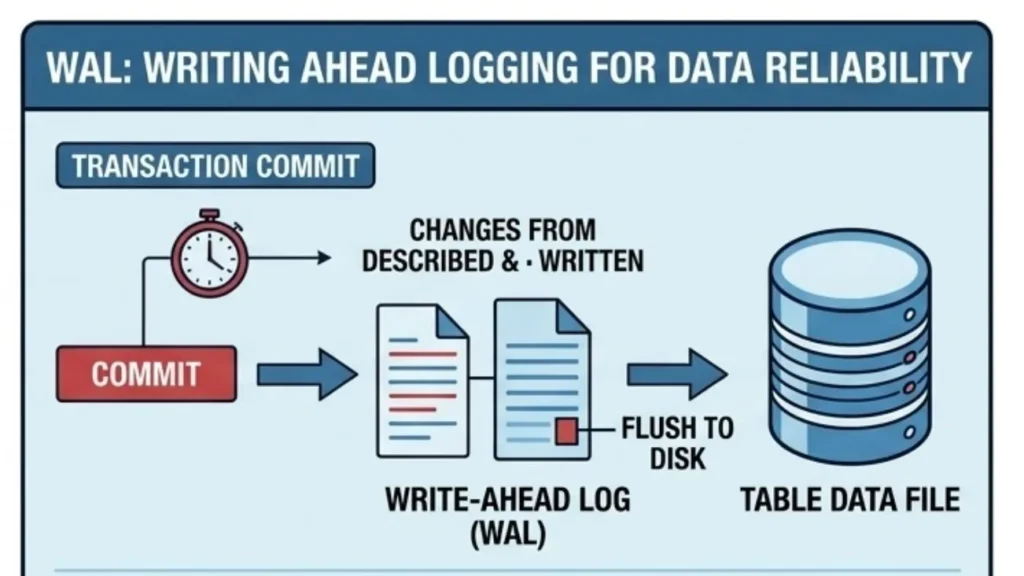
New users may wonder why their data isn’t written directly to the main table files the instant a transaction commits.
PostgreSQL uses Write-Ahead Logging (WAL) to ensure reliability. Changes are first described in a log and flushed to permanent storage. This allows the database to skip expensive data file flushes on every commit, because in the event of a crash, the system can “replay” the log to restore consistency.
Understanding WAL is key to understanding PostgreSQL’s performance and recovery mechanisms.
| Action | What happens in RAM | What happens on Disk (WAL) |
| Transaction Start | Data is modified in the “Buffer Cache.” | Nothing yet. |
| Transaction COMMIT | Transaction marked as “Complete.” | WAL Log is flushed. (Sequential & fast). |
| Checkpointer Process | No change. | Data files are updated. (Random & slow). |
Together, these six concepts—database hierarchy, search paths, identifier rules, roles, MVCC, and WAL—form the foundation of how PostgreSQL works. Understanding them early can help beginners avoid common pitfalls and manage their databases more effectively.



