If you’ve used Claude before, you probably think of it as a helpful assistant for answering questions, summarizing research, or brainstorming ideas. But Claude just leveled up — big time.
As of September 2025, Claude can now create and edit real files for you — Excel spreadsheets, Word docs, PowerPoint slides, Google Docs, and even PDFs — all from inside Claude.ai or the desktop app.
Instead of just giving you text responses, Claude can now take your instructions, process data, and hand back a ready-to-use file that you can download or open directly in Google Drive.
(Source: Anthropic Blog)
Table of Contents
Why This Matters
This isn’t just a small feature update — it’s a major step toward making AI an active collaborator rather than a passive assistant.
Before, Claude could analyze files and generate “artifacts” (interactive blocks of content) in the chat window. Now, it turns those artifacts into real, usable files that you can share, edit, or present.
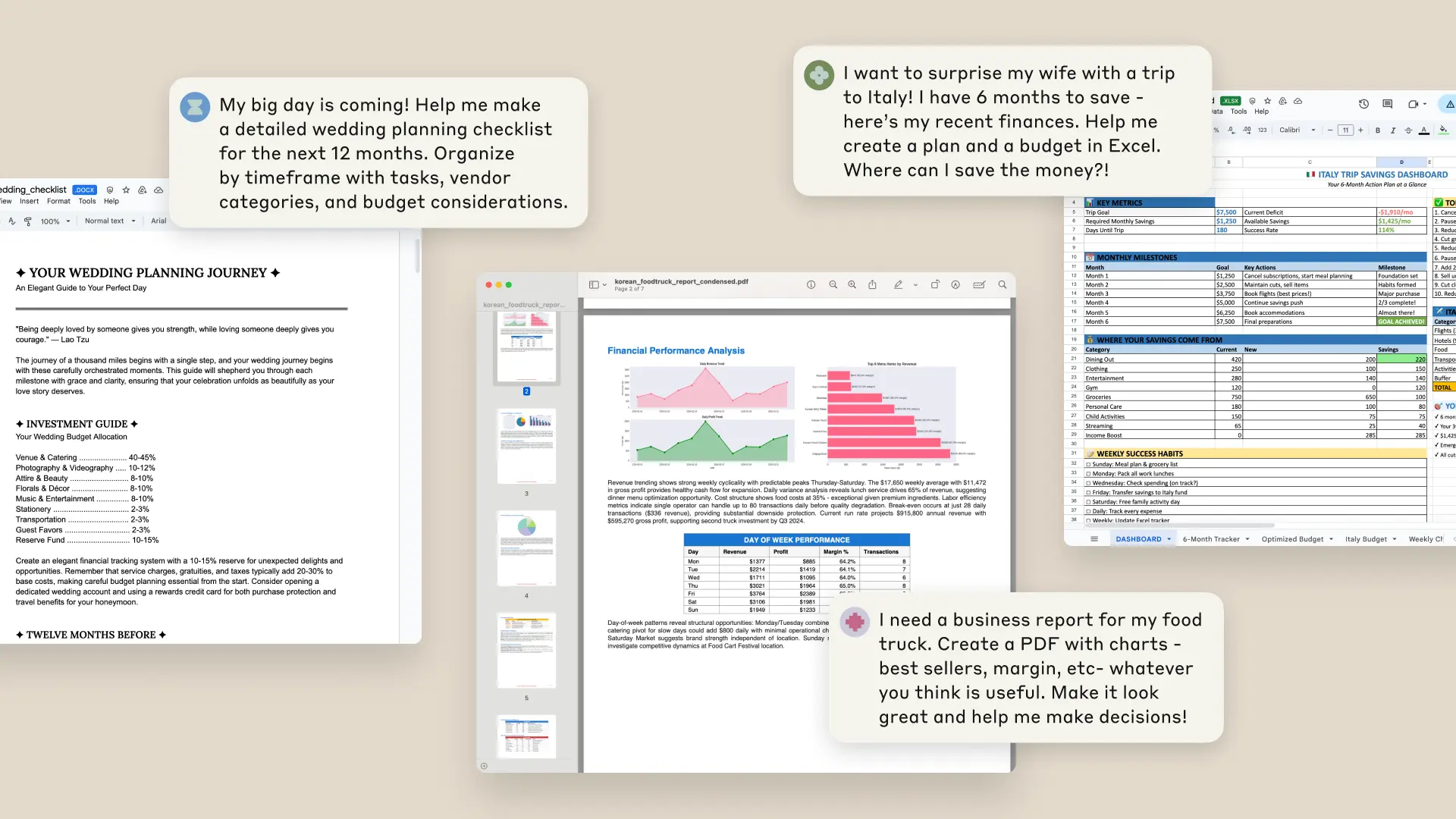
Imagine asking Claude to analyze sales data from your business, create a series of charts, and then package everything into a formatted report — and getting the finished document in minutes.
That’s exactly what Anthropic showed off in its launch video: a user uploaded CSVs from a small food truck fleet, Claude analyzed revenue trends, created visualizations, and delivered a polished DOCX file — ready to present.
How to Get Started
Getting started is easy:
- Go to Settings → Features → Experimental and enable “Upgraded file creation and analysis.”
- Upload relevant files or describe what you need.
- Guide Claude through the process if necessary.
- Download your files — or save them directly to Google Drive.
See also: Mastering the Linux Command Line — Your Complete Free Training Guide
Who Can Use It
Right now, file creation is available as a preview for Claude Max, Team, and Enterprise users. (Max users pay $200/month, Team and Enterprise users get it as part of their workplace plans.)
Claude Plus subscribers ($20/month) will get access “in the coming weeks,” according to Anthropic.
What You Can Do with It
Claude’s new file skills are designed to save you hours of manual work — and help you skip some technical learning curves. Here’s what’s possible:
- Turn data into insights. Upload raw data, get back cleaned tables, charts, and a summary of what matters.
- Build spreadsheets from scratch. Need a financial model, project tracker, or budget template? Just describe it. Claude creates it with working formulas and multiple sheets.
- Work across formats. Convert PDFs into slide decks. Turn meeting notes into Word docs. Transform invoices into organized spreadsheets.
This means projects that might normally take hours — or require coding, statistics, or spreadsheet expertise — can now be done in a few minutes of chat.
How It Works
Behind the scenes, Claude runs inside a private computer environment, where it can write code and execute programs. This is similar to ChatGPT’s new “agent mode,” which allows AI models to run tools in a safe, sandboxed space.
Think of Claude less like a chatbot and more like a junior analyst or assistant — one who can crunch numbers, generate reports, and format documents on demand.
Anthropic recommends starting with simpler tasks like data cleaning or basic reports before moving on to big projects like financial models, so you can get comfortable with how it handles files.
A Word of Caution
Because this feature gives Claude access to a private computer environment (and internet connectivity), you should be mindful of what data you upload.
Monitor chats carefully, especially if you’re working with sensitive information.
Claude’s new ability to create and edit files is more than a convenience — it’s a shift in how we work with AI.
We’re moving closer to a world where ideas flow straight into execution. Whether you’re preparing a sales forecast, cleaning messy data, or creating a pitch deck, Claude can now take you from “I need this” to “It’s done” faster than ever.
The line between conversation and creation just got a whole lot thinner.