Most ways of carving up a server lean on a hypervisor. Multikernel takes a different route. It boots several independent Linux kernels on the same box, each on real hardware, with no virtualization layer in between.
That code is now public for the first time. The tree is based on Linux 7.0 and carries the tag v7.0-mk2. Only x86_64 is supported so far. The project laid out the specifics in its announcement.
The target is large multi-core machines. On such systems, a single kernel has to schedule and manage everything. Multikernel drops that assumption. It treats one big server as a place where many kernels can coexist.
The model works like this. A host Linux instance owns the machine’s resources: its CPUs, memory, and PCI devices. It hands slices of that pool to guest kernels. Each guest then boots on its own physical cores, RAM, and hardware. Nothing sits underneath as a hypervisor. The layout can also shift while running. Stop a guest, and its resources flow back to the host. Start a new one—perhaps a completely different kernel—and it takes a fresh slice.
So what does skipping the hypervisor actually buy you? The team put numbers on it against KVM using lmbench. To keep things fair, both sides ran the same kernel build, two CPU cores, and 1 GB of memory. The test rig was a dual-socket Intel Xeon Gold 5418Y.
For raw memory work, the two were basically tied. Modern CPUs virtualize memory very well, so that tracks. The daylight opened up elsewhere—wherever a workload does frequent transitions and wakes CPUs often.
The context-switch figure tells the story. Two processes swapped in 1.37 microseconds under Multikernel. The stock KVM guest took 3.42. Pipes showed 3.24 against 7.06 microseconds. Unix sockets landed at 4.81 versus 7.48.
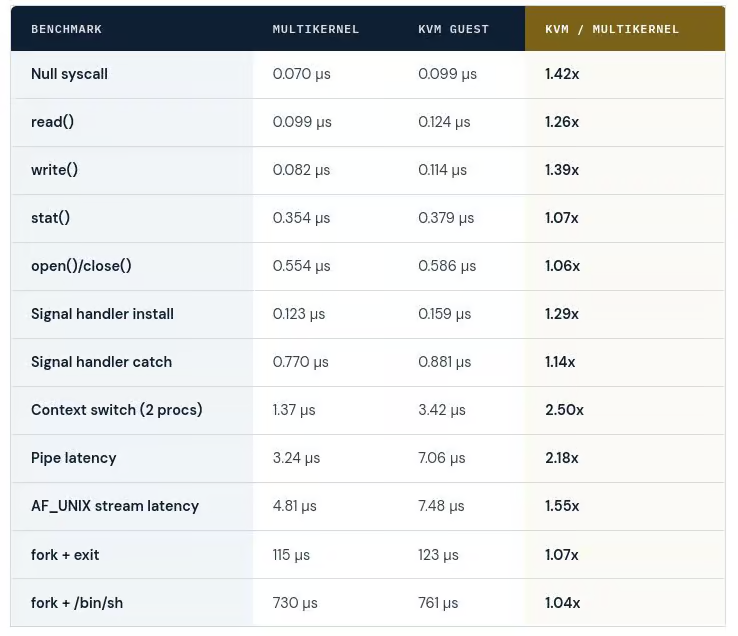
Before reading that as “always twice as fast,” look at where it comes from. The gap is mostly about idle CPUs. A default KVM guest must leave and re-enter the VM to wake an idle virtual CPU. Multikernel skips that step by driving its physical cores directly.
That shortcut isn’t free. To the host, those cores always look busy. They also burn more energy—roughly 19 watts more in this setup. The team could shave latency further by giving the guest more control over CPU power states. But that, too, trades away power and resources.
For this debut, x86_64 got the most testing. Ports to other architectures may arrive later. The developers have already split out the architecture-specific pieces to make that easier. Nothing else is officially supported yet. The source lives on GitHub, along with a getting-started guide.
See also: Mastering the Linux Command Line — Your Complete Free Training Guide
FAQ
Isn’t this just virtualization? No. Multikernel uses no hypervisor. Every kernel owns real CPUs, memory, and devices, and runs on bare metal.
Which kernel and platform? It’s based on Linux 7.0 (tag v7.0-mk2). Only x86_64 is supported today.
Does it actually beat KVM? On latency-bound tasks, often yes. One context switch measured 1.37 µs versus 3.42 µs. Broader results depend on the workload.
Why is it faster there? Mostly idle-CPU handling. KVM exits the VM to wake a virtual CPU. Multikernel controls the cores directly.
What does that cost? Higher power draw, and cores that always look fully used—about 19 extra watts in the benchmark.
Where do I get it? On GitHub, which includes a getting-started guide.