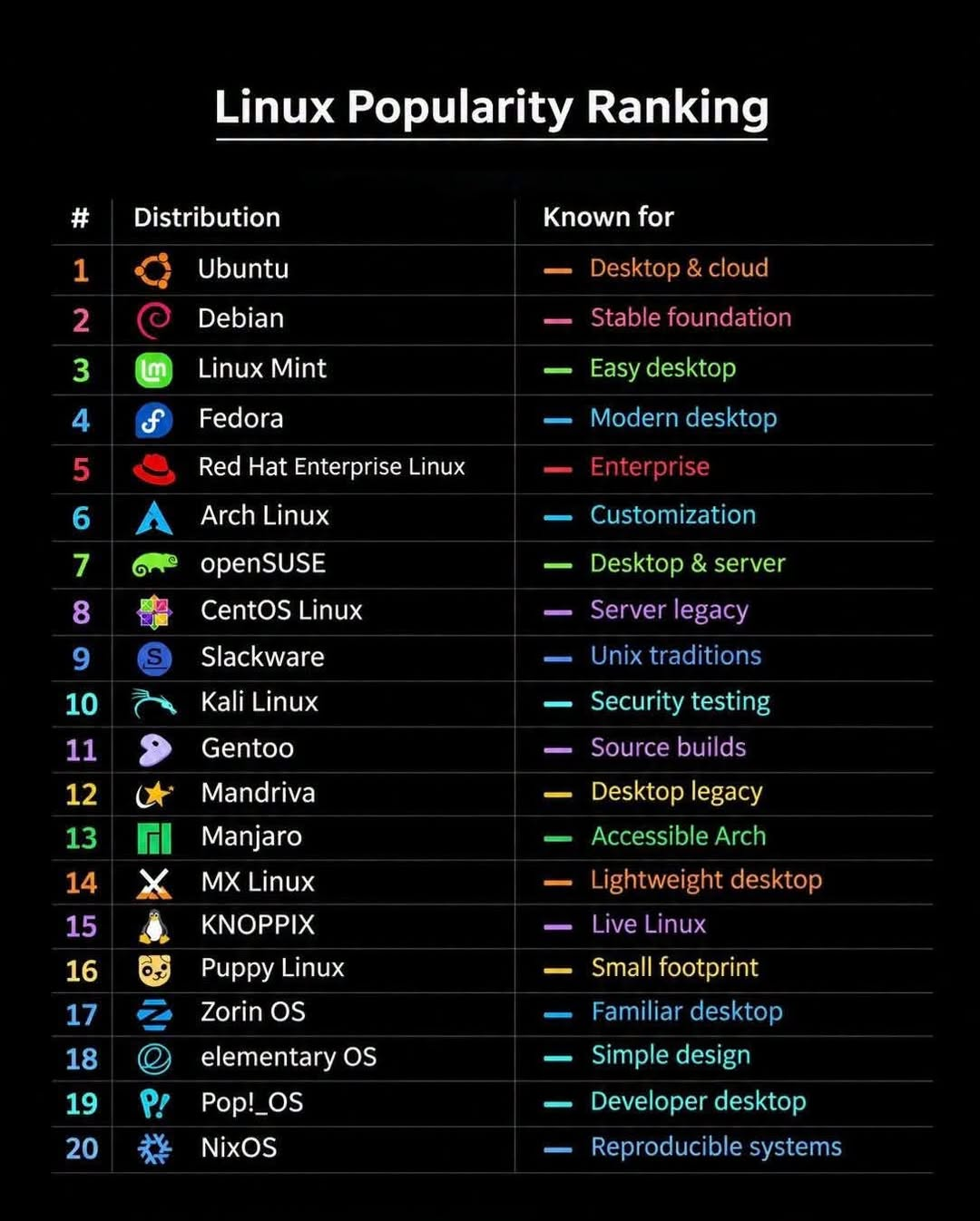
If you’ve ever searched for “which Linux should I use,” you’ve probably seen a chart like this one: twenty names, twenty logos, and a short note next to each, like “Desktop & cloud,” “Enterprise,” or “Source builds.”
It’s a nice snapshot. But if you’re new to Linux, the notes raise more questions than they answer. What does “Unix traditions” actually mean? Why is CentOS called “legacy”? And should a beginner care about Gentoo at all?
This guide goes through the list in plain English. You’ll find out what each distro is, who it’s for, and which ones you can safely ignore.
Table of Contents
First: What Is a “Distro”?
Every Linux system uses the same core: the Linux kernel. The kernel talks to your hardware, manages memory, and runs your programs.
But a kernel alone isn’t something you can use. You also need a desktop, an installer, an app store, system tools, and a way to install updates. A distribution, or “distro,” is a team’s choice of all those pieces, packaged together.
Think of it like cars. Many brands use similar engines, but a family minivan, a sports car, and a delivery truck feel completely different to drive. Linux distros work the same way.
One note about the ranking itself: “popularity” is hard to measure in Linux. Most distros don’t track installs, so charts like this one usually mix search interest, page views on sites like DistroWatch, and community size. Treat the order as a rough guide, not an official result.
The Top 5: The Names You’ll Hear Everywhere
1. Ubuntu: Desktop & cloud Ubuntu is made by Canonical, and it’s the default choice for a lot of people. It’s easy to install, it has huge community support, and it’s one of the most common systems on cloud servers. A new Long Term Support (LTS) version comes out every two years with five years of standard updates. That makes it a safe pick for both laptops and servers.
2. Debian: Stable foundation Debian is one of the oldest distros still running, and it’s built entirely by volunteers. It focuses on stability over new features. Debian is also the base that many other distros are built on, including Ubuntu. If Ubuntu is the popular restaurant, Debian is the farm supplying its ingredients.
3. Linux Mint: Easy desktop Mint is built on Ubuntu, but it feels more like a traditional Windows desktop: a start menu at the bottom left, a taskbar, and settings where you’d expect them. Many people moving from Windows find it the easiest first step.
4. Fedora: Modern desktop Fedora is sponsored by Red Hat and tends to get new technology early. It updates more often than Ubuntu or Debian, so you get newer software while it stays stable. Many developers use it every day.
5. Red Hat Enterprise Linux (RHEL): Enterprise RHEL runs in banks, airlines, telecom companies, and governments. It’s a commercial product with paid support and long life cycles. Individuals can still use it for free through Red Hat’s no-cost Developer Subscription. If you’re aiming for a Linux job, RHEL skills (and certifications like RHCSA) are worth having. Our guide on the best Linux distribution to learn for a career explains why.
6–10: Specialists and Old-Timers
6. Arch Linux: Customization Arch gives you a minimal base and lets you build exactly the system you want. It uses a rolling release model: no big version upgrades, just a steady stream of updates. The setup takes some effort, but the Arch Wiki is one of the best Linux resources anywhere, even if you never use Arch.
7. openSUSE: Desktop & server openSUSE comes in two main versions:
- Leap: stable, released in fixed versions.
- Tumbleweed: rolling and always up to date.
It has a strong reputation for polished system tools and is especially popular in Europe.
8. CentOS Linux: Server legacy For years, CentOS was the free copy of RHEL that ran a huge share of the world’s web servers. That’s why it’s on the list. But CentOS Linux has reached end of life: CentOS 7 stopped getting updates in June 2024. The project now focuses on CentOS Stream, which sits ahead of RHEL instead of copying it. If you want what CentOS used to be, look at Rocky Linux or AlmaLinux.
9. Slackware: Unix traditions Slackware first came out in 1993, which makes it one of the oldest Linux distros still maintained. It keeps things simple and close to classic Unix: plain text configuration files and very little automation. It’s loved by people who want to understand exactly how their system works.
10. Kali Linux: Security testing Kali comes loaded with hundreds of tools for penetration testing and security research. It’s built for that one job. It isn’t meant to be an everyday desktop, and beginners who install it as their first Linux often have a frustrating time.
11–15: Niche, Lightweight, and Historical
11. Gentoo: Source builds On Gentoo, you traditionally compile software from source code on your own machine, tuned for your exact hardware. It’s a great way to learn how Linux fits together, but installing software takes much longer. Gentoo now also offers pre-built binary packages for people who don’t want to compile everything.
12. Mandriva: Desktop legacy Mandriva (earlier known as Mandrake) was one of the friendliest desktop distros of the early 2000s. It’s no longer developed. It’s on the list for its history and its descendants, such as Mageia and OpenMandriva. Don’t install Mandriva itself today.
13. Manjaro: Accessible Arch Manjaro is based on Arch but adds a graphical installer and holds updates back a little longer to test them first. You get many of Arch’s benefits with much less setup.
14. MX Linux: Lightweight desktop MX is based on Debian and known for being fast on older or low-spec computers. It also includes a set of handy built-in tools for setting up your system.
15. KNOPPIX: Live Linux KNOPPIX was one of the first popular live distros, meaning it runs straight from a CD or USB stick without installing anything. It was especially popular as a rescue tool for fixing broken computers. Today most distros can run live, but KNOPPIX helped make the idea popular.
16–20: Friendly Desktops and Something Different
16. Puppy Linux: Small footprint Puppy is tiny and can run entirely in your computer’s memory. It’s perfect for reviving very old machines or carrying a whole system on a USB stick.
17. Zorin OS: Familiar desktop Zorin is based on Ubuntu and is designed to look and feel like Windows, or like macOS if you prefer. It’s another good choice for people switching from Windows who want things to feel familiar.
18. elementary OS: Simple design elementary is also based on Ubuntu and focuses on a clean, consistent design that many people compare to macOS. It’s calm, tidy, and easy on the eyes.
19. Pop!_OS: Developer desktop Pop!_OS is made by System76, a company that sells Linux laptops and desktops. It’s popular with developers and gamers for its good out-of-the-box support for NVIDIA graphics and its keyboard-friendly window tiling.
20. NixOS: Reproducible systems NixOS works very differently from the others. You describe your entire system in a configuration file, including packages, users, and services, and NixOS builds it to match. If an update breaks something, you can roll back to a previous version with one command. It’s powerful, but there’s a lot to learn.
How These Distros Are Related
Most of these twenty distros belong to a few big families:
- Debian family: Debian → Ubuntu → Linux Mint, Zorin OS, elementary OS, Pop!_OS. MX Linux is built on Debian directly.
- Red Hat family: Fedora → CentOS Stream → RHEL. Rocky Linux and AlmaLinux are rebuilt from RHEL.
- Arch family: Arch Linux → Manjaro.
- Independent: Slackware, Gentoo, openSUSE, NixOS, Puppy (whose builds can be based on other distros).
This matters more than it seems. Distros in the same family use the same package tools (apt for Debian-based, dnf for Red Hat-based, pacman for Arch-based). So once you learn one, the rest of the family feels familiar.
So Which One Should You Pick?
| If you are… | Try |
|---|---|
| New to Linux, coming from Windows | Linux Mint or Zorin OS |
| Want something polished and popular | Ubuntu or Fedora |
| Running a server | Debian, Ubuntu LTS, or RHEL (or Rocky/AlmaLinux) |
| Studying for a Linux job | RHEL, Fedora, or Rocky Linux (see our career guide) |
| Reviving an old computer | MX Linux or Puppy Linux |
| Want to learn how Linux really works | Arch, Gentoo, or Slackware |
| Doing security research | Kali Linux (in a virtual machine) |
The best part is that you don’t have to commit. Most of these distros let you boot from a USB stick and try them without installing anything. Spend an afternoon testing two or three, then keep the one that feels right.
There’s no wrong answer here. Ubuntu, Mint, and Fedora all run the same Linux kernel, and almost everything you learn on one carries over to the others.